
m:Print® v4 Pharmacy Barcode Labeling Software
m:Print® v4 is pharmacy barcode labeling software for unit dose medication packaging, manual packaging and accessory labeling. It is DSCSA barcode label software: with 1-Click Print® autofill, the software scans the DSCSA 2D barcode on the stock container, captures the NDC, lot and expiry, selects the right label template, calculates the beyond-use date and sends the run to the iPack® Rx or to any thermal printer. Design any label, run it on any printer, and manage templates for every site on your network from one place.
Unit Dose Medication Barcode Labeling Software Built for DSCSA
Tell us about your needs, and we’ll help you find the right solution.
1-Click Print® Autofill: Scan the Bottle, Print the Label
The m:Print® v4 Bar Code Labeling Software simplifies pharmacy packaging and labeling through advanced automation, customizable label design, and exclusive 1-Click Print® technology. Designed to support pharmacy efficiency, compliance, and patient safety, the m:Print® v4 helps reduce manual data entry while streamlining medication labeling workflows.
Download Brochure Contact Pearson MedicalSee 1-Click Print® Technology in Action
Watch how m:Print® v4 Bar Code Labeling Software simplifies pharmacy labeling with 1-Click Print® Technology, helping improve accuracy, efficiency, and compliance throughout the packaging process.

What else is in m:Print® v4
- Scan, parse, input, and read all data in the DSCSA barcode.
- Automatic Package Numbering
- Bar Code Constructor
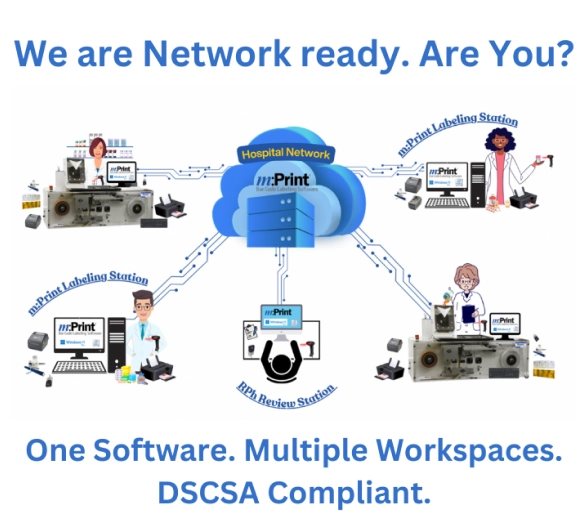
- Network Version
- Remote RPh Approval*
- Hazardous Drug Indicator
- Auto-Populate & Auto-Calculate BUD
- USP 1146 and USP 1178 beyond-use date (BUD) calculations.
- Instant Previous Label Lookup
- Custom Designed Reports
- Multi-Language Enabled for International Use
- Enhanced Data Filtering Functions
- Pill & Label Image Printed on Reports
- USP 1146 & USP 1178 BUD Calculations
- Unlimited Custom Fields
- Automatic New York pharmacy BUD interval calculations.
- Scheduled Database Backup
- Pre-Print RPh Approval
- Welcome Screen with User Message Board
- Fractional Pill Indicator
- SQL Database
- Import Drug Database
- International Version
Key Features
- Design unlimited custom templates for roll, sheet, and flag labels with just a few clicks
- Compatible with all label supplies
- Share data across multiple locations, including Drug Database, User Credentials, Label Templates, Reports, Remote RPh Approval, and Messages
- DSCSA-compliant for producing and scanning complex bar codes
- Supports FDA Drug Supply Chain Security Act (DSCSA) requirements
- Previous Label Lookup for increased efficiency and faster template recall
- Designate user access to specific functions
- Custom Roles & Permissions
- Optional pharmacist pre-approval
- Fingerprint reader support for quick sign-in
- Enhanced reporting capabilities for improved data visibility
- Networking option available
- Automatic backup scheduling
- Multi-language enabled for international use
- Fractional Pill Indicator
Frequently Asked Questions
-
What is m:Print® v4 Bar Code Labeling Software used for?
m:Print® v4 is designed to create, manage, and print pharmacy labels, including unit dose, syringe, vial, ampoule, and other medication labels while supporting compliance and workflow efficiency.
- What is 1-Click Print® Technology?
- Is m:Print® v4 DSCSA compliant?
- Can m:Print® v4 be used across multiple pharmacy locations?
- Is m:Print® v4 DSCSA barcode label software?
- What does 1-Click Print® autofill do?
- Can m:Print® v4 print unit dose labels on a printer we already own?
Request a Quote
Learn how m:Print® v4 Bar Code Labeling Software can help your pharmacy improve labeling accuracy, streamline workflows, and support compliance requirements.
Request a Quote

Reduce Medication Labeling Errors and Improve Efficiency
Subscribe to receive product updates, industry insights, regulatory developments, and practical solutions designed to improve pharmacy efficiency and patient safety.
Subscribe To Our NewsletterDownload our Whitepaper on Beyond Use Dates Download our Whitepaper on the DSCSA Barcode
Serving pharmacies throughout the United States and internationally including hospitals, long-term care, specialty pharmacy, repackagers, military, government, nutraceutical, and more.

